

All products
-
Home appliances
- Large home appliances
- Washing machines
- Tumble dryers
- Dishwashers
- Cookers
- Built-in hobs
- Built-in ovens
- Cooker hoods
- Accessories
- Kitchen appliances
- Microwave ovens
- Food processors
- Blenders
- Mixers
- Meat grinders
- Food steamers
- Multicookers
- Mini ovens
- Air grills
- Bread makers
- Toasters
- Deep fryers
- Kettles
- Thermo pots
- Coffee machines
- Coffee grinders
- Scales
- Food slicers
- Juicers
- Tabletop cookers
- Accessories
- Household appliances
- Vacuum cleaners
- Floor scrubbers
- Steam generators
- Steam cleaners
- Irons
- Ironing equipment
- Clocks and weather stations
- Water softeners
- Accessories
-
Heating and air conditio...
-
Sewing equipment
-
Professional equipment
-
Health and beauty applia...
-
Products for children
-
Audio and video
-
Photo, video and optics
-
Computers and peripherals
- Computers and peripherals
- Laptops and netbooks
- Desktop computers
- All-in-one computers
- Tablets
- Game consoles
- Monitors
- Computer mice
- Keyboards
- Headphones
- Microphones
- Components
- Display panels
- Cooling systems
- RAM
- Motherboards
- Graphics cards
- Hard disk drives (HDD)
- Optical drives
- Power supplies
- Computer cases
- External storage
- External hard drives
- Memory cards
- Printers and scanners
- Printers
- Multifunction printers
- Scanners
- Projectors
- Projectors
- Projection screens
- Accessories
- Networking equipment
- Wireless routers
- Accessories
- Consumables
- Cartridges
- Toner
- Mechanical parts
- Chemicals
- Cleaning solutions
- Accessories
- Screen protectors
- Stickers
- CD wallets, cases and sl...
- Кабели
- Батарейки
- Аккумуляторы
- Зарядные устройства
- Серверное оборудование
- Серверы
-
Phones and fax machines
-
Home security
-
Seasonal products
-
Construction and renovation
-
Tools
- Электроинструменты
- Drills
- Diamond drills
- Перфораторы
- Demolition hammers
- Power screwdrivers
- Nut runners
- Jigsaws
- Planers
- Routers
- Grinding and sanding mac...
- Reciprocating saws
- Circular saws
- Mitre saws
- Ножницы
- Пылесосы
- Concrete mixers
- Heat guns
- Welding machines
- Electric saws
- Water pressure systems
- Compressors
- Tile cutters
- Насосы
- Electric trimmers
- Electric screwdrivers
- Bench grinders
- Drilling machines
- Polishers
- Lawn mowers
- Миксеры
- Router tables
- Electric hoists and winches
- Laser levels
- Аксессуары
- Petrol-powered tools
- Petrol generators
- Petrol chainsaws
- Petrol brushcutters
- Engine-driven pumps
- Blowers
- Motor cultivators
- Snow-clearing machines
- Lawn mowers
- Pneumatic tools
- Pneumatic nail guns
- Hand tools
- Sprayers
- Pumping stations
-
Furniture and interiors
-
Transport
-
Sport and Travel
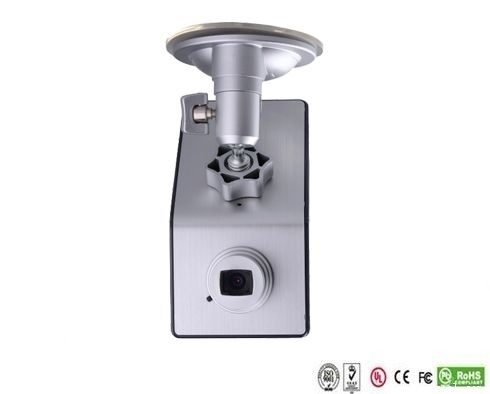
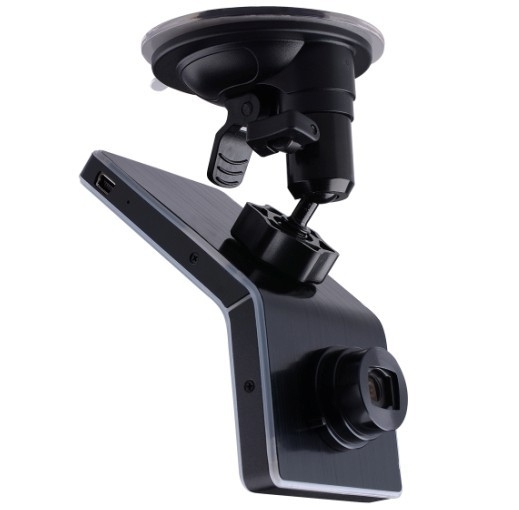
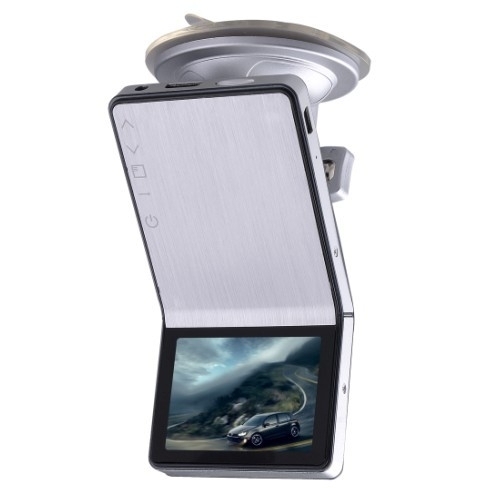
Видеорегистратор Autois DVR-10 Full HD
Looking for this model? Contact us to check the price, availability or a suitable alternative.
Request an offer
Description
Краткий обзор
Lens: Fixed, 4G, f=2.6mm F=2.0
Lens Viewing Angle: 120°
Focus Range: 1.8m to infinity
Display Screen: 2.4”TFT LCD
AV Output: HDMI Port, CTS1.2, AV Out Port, CVBS
USB Output: USB Port, USB2.0
TV System: NTSC / PAL
Video Format: MOV
Video Resolution: 1920*1080, 1280*720, 848*480, 640*480
Video Compress Format: MPEG- 4AVC / H.264
Audio Built-in Microphone/Speaker
Recording Media: Support Micro SD Card up to 32GB
Record Cycle, Not Cycle
RTC Yes
OSD Language: English / Italian / Russian
/Japanese / S. Chinese / T. Chinese
PC Interface: USB2.0
Power Supply: 12V / 24V convert to 5V,
Built-in Li-ion Battery
Size: 60x120x35mm
Weight: 115G
Working Temperature: -10~70 C
Storage Temperature: -30~85 C
Описание
Full HD1080P car camera reversing, 5.0 Mega Pixel Sensor Car Camera DVR.
Full HD 1080P Mobile-I DVR-10 Car Black Box
1. iPhone fashionable style and Ultimate Slim Design leads the fashion trend
2. 1080P high-resolution, 500 million actual pixels SENSOR, H.264 compression format. Best expression!
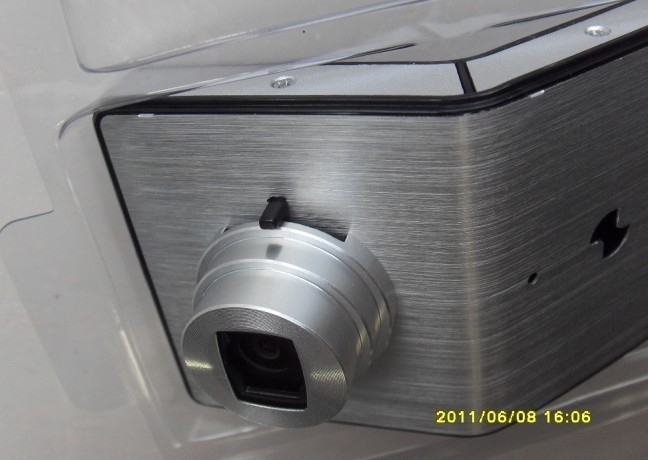
3. The unique adjustable angle lens, hidden button-shaped set, excellent surface treatment process. It is the Boutique of car dvr.
4. Cool and stylish black and silver color.
Specifications
Image Sensor: 5.0 Mega Pixel
Lens: Fixed, 4G, f=2.6mm F=2.0
Lens Viewing Angle: 120°
Focus Range: 1.8m to infinity
Display Screen: 2.4”TFT LCD
AV Output: HDMI Port, CTS1.2, AV Out Port, CVBS
USB Output: USB Port, USB2.0
TV System: NTSC / PAL
Video Format: MOV
Video Resolution: 1920*1080, 1280*720, 848*480, 640*480
Video Compress Format: MPEG- 4AVC / H.264
Audio Built-in Microphone/Speaker
Recording Media: Support Micro SD Card up to 32GB
Record Cycle, Not Cycle
RTC Yes
OSD Language: English / Italian / Russian/Japanese / S. Chinese / T. Chinese
PC Interface: USB2.0
Power Supply: 12V / 24V convert to 5V, Built-in Li-ion Battery
Size: 60x120x35mm
Weight: 115G
Working Temperature: -10~70 C
Storage Temperature: -30~85 C

Video Recording
After connecting Mobile-i to socket by car charger and the cable, it'll start recording automatically if it's set in cycle recording. If it's not cycle recording, it'll turn on automatically and then you have to manually press on <Power Switch > key to start recording.
Please use our standard car charge and USB cable for power supply, or it may not successfully charged by the ones from others.
Now the really time image will display on Mobile-i screen.
Stop engine, it'll keep on recording for about 10 seconds and then shutdown. If don't want to record during driving, please manually press on <Power Switch > key to save the video and turn off it.
* Some kinds of vehicles are designed for long-term power supply that can't shut down automatically and need manually press on <Power Switch > key to save the video and turn off Mobile-i.
* Under not cycle recording mode, Mobile-i will save the videos and stop recording automatically when the memory card is full.
If Mobile-i isn't connecting to the socket, please manually press on <Power Switch > key to turn it on, and then real time image will display on the screen and press on <Power Switch > key to start video recording.
Press on <Power Switch > key again to save video automatically and stop recording. Long-press on <Power Switch > key until hearing a sound to turn off Mobile-i.
* The first time you use Mobile-i, we suggest charge its battery for 3 hours.
* If you won't use Mobile-i for a long time, please recharge the battery in every two months to prolong its' service life.
Video Playing
Play the video by Mobile-i screen
Turn on Mobile-i and stop recording, long-press on <Enter >
key to enter into preview mode, press on <Up > <Down >
key to select video and press <Enter > key to start video playing.
Play the video by PC
Please stop recording before connecting Mobile-i to PC. Use the USB cable to connect it to PC and a removable disk will show up in my computer accordingly. Now it can be used as a large capacity disk.
All the videos are saved in the disk. Choose a suitable player to play the videos.
If you want to save the video forever, please copy the video to your PC.
Play the video by TV
a. Use TV cable to Connect Mobile-i to TV, then the real time image will show on TV, press on <Enter > key to play video. Press on <up > or <down >key to select video to play when there are more than one video in it.
b. Use HDMI cable to connect the attached HDMI Convertor to HDTV, then the real time HD image will show on HDTV which creating the vision enjoyment for you. Control the video
playing by the bottoms on Mobile-i.
* Before playing the video by TV ( a.b), please press on <Power Switch > key to turn on Mobile-i first.
* HDMI Convertor are included but no HDMI cable, please purchase it in separately
LED Status
Working Status Red Green Blue
Power Off Off Off
Power On Off ON Off (On under charging)
Recording FLASH ON Off (On under charging)
SD Car bad contact Off FLASH Off (On under charging)
USB Mode Off ON Off (On under charging)
USB Mode(no SD card) ON ON Off (On under charging)
Li-ion battery low Off Off Flash and then shutdown automatically
Program Update
Please go to our website www.ricoel.com to download the latest program.
Use the attached USB Cable to connect Mobile-i to PC and then copy the program to the SD card.
Press on <Power Switch > key to turn on Mobile-i, and then it'll automatically update the program and after the update finish, it'll shut down automatically.
Please delete the program from the SD card after update, or it'll update the program automatically every time you turn on Mobile-i.
Product reviews
Be the first to review this product.
Write a review
Sign in to write a review of this product.
Sign inWe moderate for relevant product experience, spam, personal details and abuse. We publish positive and negative opinions; a low rating alone is not a reason for rejection.