

All products
-
Home appliances
- Large home appliances
- Washing machines
- Tumble dryers
- Dishwashers
- Cookers
- Built-in hobs
- Built-in ovens
- Cooker hoods
- Accessories
- Kitchen appliances
- Microwave ovens
- Food processors
- Blenders
- Mixers
- Meat grinders
- Food steamers
- Multicookers
- Mini ovens
- Air grills
- Bread makers
- Toasters
- Deep fryers
- Kettles
- Thermo pots
- Coffee machines
- Coffee grinders
- Scales
- Food slicers
- Juicers
- Tabletop cookers
- Accessories
- Household appliances
- Vacuum cleaners
- Floor scrubbers
- Steam generators
- Steam cleaners
- Irons
- Ironing equipment
- Clocks and weather stations
- Water softeners
- Accessories
-
Heating and air conditio...
-
Sewing equipment
-
Professional equipment
-
Health and beauty applia...
-
Products for children
-
Audio and video
-
Photo, video and optics
-
Computers and peripherals
- Computers and peripherals
- Laptops and netbooks
- Desktop computers
- All-in-one computers
- Tablets
- Game consoles
- Monitors
- Computer mice
- Keyboards
- Headphones
- Microphones
- Components
- Display panels
- Cooling systems
- RAM
- Motherboards
- Graphics cards
- Hard disk drives (HDD)
- Optical drives
- Power supplies
- Computer cases
- External storage
- External hard drives
- Memory cards
- Printers and scanners
- Printers
- Multifunction printers
- Scanners
- Projectors
- Projectors
- Projection screens
- Accessories
- Networking equipment
- Wireless routers
- Accessories
- Consumables
- Cartridges
- Toner
- Mechanical parts
- Chemicals
- Cleaning solutions
- Accessories
- Screen protectors
- Stickers
- CD wallets, cases and sl...
- Кабели
- Батарейки
- Аккумуляторы
- Зарядные устройства
- Серверное оборудование
- Серверы
-
Phones and fax machines
-
Home security
-
Seasonal products
-
Construction and renovation
-
Tools
- Электроинструменты
- Drills
- Diamond drills
- Перфораторы
- Demolition hammers
- Power screwdrivers
- Nut runners
- Jigsaws
- Planers
- Routers
- Grinding and sanding mac...
- Reciprocating saws
- Circular saws
- Mitre saws
- Ножницы
- Пылесосы
- Concrete mixers
- Heat guns
- Welding machines
- Electric saws
- Water pressure systems
- Compressors
- Tile cutters
- Насосы
- Electric trimmers
- Electric screwdrivers
- Bench grinders
- Drilling machines
- Polishers
- Lawn mowers
- Миксеры
- Router tables
- Electric hoists and winches
- Laser levels
- Аксессуары
- Petrol-powered tools
- Petrol generators
- Petrol chainsaws
- Petrol brushcutters
- Engine-driven pumps
- Blowers
- Motor cultivators
- Snow-clearing machines
- Lawn mowers
- Pneumatic tools
- Pneumatic nail guns
- Hand tools
- Sprayers
- Pumping stations
-
Furniture and interiors
-
Transport
-
Sport and Travel
Видеорегистратор Autois DVR-8 HD
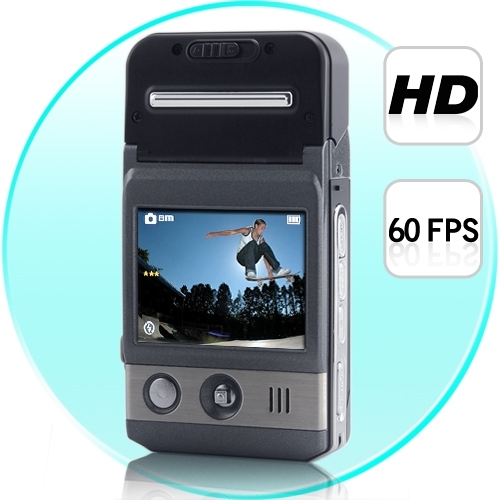
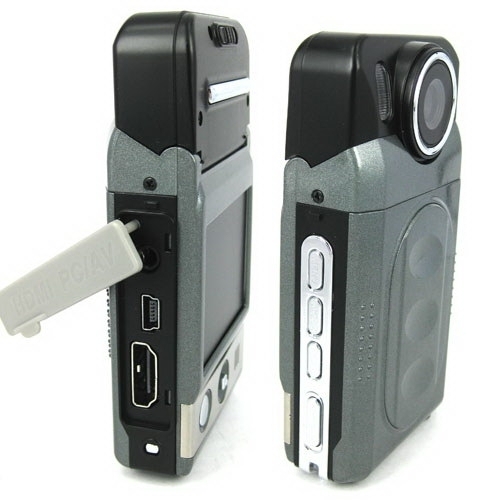
Looking for this model? Contact us to check the price, availability or a suitable alternative.
Request an offer
Description
|
Sensor |
5.0Mage pixel CMOS |
|
Still mage |
4032X3024(12M);3264X2448(8M); |
|
Recording resolution |
1280X720,640X480,320X240 |
|
Display |
2.0″ TFT LCD |
|
Extral |
SD Card(Up to 32GB ) |
|
Zoom |
8 x Digital zoom |
|
EV |
EV-2---EV+2 |
|
White Balance |
Auto/Sunny/Cloudy/Tungsten/Fluorescent |
|
ISO |
Auto/100/200/400 |
|
Format |
JPEG /AVI |
|
Port |
USB2.0/HDMI/TV (PAL/NTSC) |
|
Sys. request |
Windows 2000/XP/VISTA/7 |
|
Power |
Rechargeable li-ion battery |
|
Wrok Temp |
0-40 ℃ |
|
Size(mm) |
98.2(L) X 53(W) X 22.5 (H) MM/ Weight: 88 g |
Описание
Features
Mini size mobile lens with combination design cooperates with multi-function to use , helping you screen HD videos or photo easily in every situations . Catch the high definition pictures at will, and show vivid again.

•2.0 inch LTPS TFT LCD
•1/2 inch high definition with photosensitive original part .
•4 pieces fix foucus lens:foucus range:10cm-infinity
•8 X Digital zoom
•120 DEGREE View-Angle
•Night-Vision
•Video format:AVI
•Built-in Mic and speaker
•High capacity lithium-ion rechargeable battery
•Support SD(SDHC)card
•HDMI port:TV/HDMI,suitable for high definition TV
•Loop video recording functions.
•Set video recording time.
•Set 180-degree reverse shot
•charging while video recording
•Can be sent to automatically recording when the car engin starts
•Screen sleeping mode

Instruction
Inserting and Taking out Battery
1.Open battery cover by pushing it down.
2.Insert battery according to the “+””-” marks to the right positions.
3. Please refer to the following diagram for battery status.

1.Battery cover must be open before take out the battery.。
Charging battery
Using the charger:One end of cable connectsthe charger and the other links the USB port of the camcorder,It will take about 4 hours under the camcorder is on.
Inserting &Taking out Memory Card(SDHC card)
1.Carefully insert the memory card into card slot until the card is tightly fixed.
2.To remove the card,memory the card softly,and then it will bounce out.
Note:
1.Before using SD card,please check if it is locked.
2.Please make sure SD card is insert to the right direction.Insert to direction it might cause damage to camcorder and SD cards.
3.After SD card has been into the card solt.the camcorder will automatically take SD card as default storage card,therefore all data stored before insert cannot be read until it has taken out.
4.If the memory card is not campatible with Camcorder,The card might be not be read.In this case,take out the card and insertit again or just change to another SD card.
Installing the Hanging Strap
The ring in the camcorder is designed for hanging strap or buckle.Available for fashion style and convenience to use.
Operation Instructions
Turn on/off camcorder and Automatic shut-off setting
1.Press power button for 1 second to turn on/off.
2. Roatate lens as below:

1.In order to save the power of the battery,auto off can be set in the “setting menu”.If no operation is conducted during the set time period ,the camcorder will turn off automaticaly.
Setting Date and Time
Turn on the power,Under any mode,press “MEMU" to setting mode.Press direction button downwards to select the “Date /time”.and then Press “OK”to setting the date and time,later press “OK”buttion again in order to finish the setting.

Camcorder mode
1.Camcorder automatically goes to video mode after it is turn on.At this time “ ”will appears upper right corner of the screen.
2.Press “REC”button to start recording,in order to stop recording,press record button again.
3.Press"MENU" button to enter menu,under menu mode can revise:
Resolution:set resolution of shoot
Video Time:This camcorder have automatic cover and loop recording function wich divide d into two models,one is 1 minutes,the other is 5 minutes.
4.You connect the camera to car charger, then the camera starts up automatically and records a vedio
Please do not move lens fastly when shooting,avoid scene switch quickly,only in this way you can shoot high quality video.
Night lights turned on,when lens focus on an object with a reflective surface,there can be a reflective film, exposure. Using it with cautions!
Camcorder mode
1.Camcorder automatically goes to video mode after it is turn on.At this time “ "will appears upper right corner of the screen.
2.Press “REC”button to start recording,in order to stop recording,press record button again.
3.Press"MENU" button to enter menu,under menu mode can revise:
Resolution:set resolution of shoot
Video Time:This camcorder have automatic cover and loop recording function wich divide d into two models,one is 1 minutes,the other is 5 minutes.
4.You connect the camera to car charger, then the camera starts up automatically and records a vedio
Please do not move lens fastly when shooting,avoid scene switch quickly,only in this way you can shoot high quality video.
Night lights turned on,when lens focus on an object with a reflective surface,there can be a reflective film, exposure. Using it with cautions!
Camera mode
1.Press power key to turn on camcorder AND It will go to video mode automatically,press”mode”switch to the photograph mode,the upper left corner of the screen will show “ ”and the buttonof the screen will display the maximum photo capacity.
2.Alignment by camcorder to the subject which to be taken,using direction key upwards and downwards in order to adjust focus.
Press “REC”button to take photos.
Please grasp camcorder to reduce vibrate when take photos.
Playback Mode
1.Turn on camcorder to video mode,press review key to enter into single-picture review mode,press directionkey leftwards and rightwards to review picutres or videos.
2.Delete
while reviewing (Reviewing pictures/video),press “Menu”,then delete key will appear on the screen,press “ok” to delet display,and press the direction key right to choose deleting file,then press “ok”to confirm.
Setting Mode
1.Regarding to video/camera/review mode,press”Menu” button could enter into any corresponding setting menu.
2.At any menu mode,press “OK”button will enable user for menu setting options to choose preferred setting,then press “ok”confirm.
Screen sleep mode
In the photography or camera video capture mode,press left key,you can enter into the screen sleep mode,press left key once again reverted to the orginal mode.
File backup
USB back up mode
Firstly,to press the “Memu”button to select the “USB”,Secondly,to press “OK”button to select the “Disk Drive,Thirdly,to press “OK”button to comfirm.With USB cable connected to the machine and computer.
Connecting camcorder to TV
1.Connecting camcorder to HDTV with an HDMI cable to review pictures and videos.
2.Connecting camcorder to television with TV cable to review pictures and video.

Function Keys
Video/camera mode
Power button Turn on or off camcorder
Shutter Button video recording /Stop
Direction Button(UP) 1/2/3/4/8 Digital zoom
Direction Button(Down ) 1/2/3/4/8 Digital zoom
Direction Button(Left) Fast switch to browerse picture video informations
Direction Button(Right) Night Light: On/Off
Menu Button Menu option
Mode Button Mode option
Playback Button Pictures and video review
Review Mode
Preview Mode(single-picture)
Power button Turn off camcorder
Direction button(Down) Index graphical representation
Direction button(Left) Last page
Product reviews
Be the first to review this product.
Write a review
Sign in to write a review of this product.
Sign inWe moderate for relevant product experience, spam, personal details and abuse. We publish positive and negative opinions; a low rating alone is not a reason for rejection.