

Toate produsele
-
 Electrocasnice
- Electrocasnice mari
- Mașini de spălat
- Uscătoare de rufe
- Mașini de spălat vase
- Aragaze
- Plite încorporabile
- Cuptoare încorporabile
- Hote
- Accesorii
- Tehnică de bucătărie
- Microunde
- Combaine de bucătărie
- Blendere
- Mixere
- Mașini de tocat carne
- Aburitoare
- Multifierbătoare
- Mini cuptoare
- Aerogrili
- Cuptoare de pîini
- Prăjitoare de pîini
- Friteuze
- Ceainice
- Termopote
- Aparate de cafea
- Râșnițe de cafea
- Cântare
- Feliatoare
- Storcătoare
- Plite de masă
- Accesorii
- Tehnică pentru casă
- Aspiratoare
- Mașini de spalat podelele
- Generatoare de abur
- Curățătoare de abur
- Fiere de călcat
- Echipamente de călcat
- Ceasuri și stații meteo
- Dedurizatoare de apă
- Accesorii
-
 Tehnică climaterică
-
 Tehnică de cusut
-
 Tehnică profesională
-
 Tehnică p/u sănătate si ...
-
 Produse pentru copii
-
 Audio-Video
-
 Foto-Video-Optică
-
 Calculatoare și periferice
- Calculatoare și periferice
- Notebook-uri și netbook-uri
- Blocuri de sistem
- Monoblocuri
- Tablete
- Console pentru joc
- Monitoare
- Mouse
- Tastiere
- Căști
- Microfoane
- Componente
- Matrice
- Sisteme de răcire
- Memorii operative
- Plăci de bază
- Carduri video
- Discuri flexibile (HDD)
- Unități optice
- Surse de alimentare
- Carcase
- Memorie externă p/u stocare
- Discuri flexibile externe
- Carduri de memorie
- Imprimante și scanere
- Imprimante
- Aparate multifuncționale
- Scanere
- Proiectoare
- Proiectoare
- Ecrane
- Accesorii
- Echipamente de rețea
- Routere fără fir
- Accesorii
- Consumabile
- Cartușe
- Toner
- Mecanică
- Chimie
- Soluție p/u curățare
- Accesorii
- Pelicule de protecție
- Autocolante
- Poșete, cutii, plicuri p...
- Cabluri
- Baterii
- Acumulatori
- Încărcătoare
- Echipamente p/u servere
- Servere
-
 Telefoane si faxuri
-
 Casa protejată
-
 Produse sezoniere
-
 Construcție și reparație
-
 Instrumente
- Electroinstrumente
- Mașini de găurit
- Mașini de găurit cu diamant
- Perforatoare
- Ciocane demolatoare
- Mașini de înșurubat
- Mașini de înșurubat piulițe
- Ferăstraie pendulare
- Rindele
- Mașini de frezat
- Mașini de șlefuit
- Ferăstraie sabie
- Ferăstraie circulare
- Ferăstraie pentru tăieri...
- Foarfece
- Asiratoare
- Betoniere
- Pistoale cu aer cald
- Aparate de sudură
- Ferăstraie electrice
- Hidrofoare
- Compresoare
- Mașini de tăiat gresie ș...
- Pompe
- Trimmere electrice
- Șurubelnițe electrice
- Polizoare de banc
- Mașini de găurit
- Mașini de lustruit
- Mașini de tuns gazonul
- Mixere
- Mese pentru mașini de fr...
- Dispozitive electrice de...
- Nivele laser
- Accesorii
- Scule pe benzină
- Generatoare pe benzină
- Ferăstraie pe benzină
- Motocoase
- Motopompe
- Suflante
- Motocultoare
- Mașini de îndepărtat zăpada
- Mașini de tuns gazonul
- Scule pneumatice
- Pistoale pneumatice de b...
- Scule de mână
- Pulverizatoare
- Stații de pompare
-
 Mobilă și interier
-
 Transport
-
 Sport și călătorii
Program de lucru
Видеорегистратор Autois DVR-10 Full HD
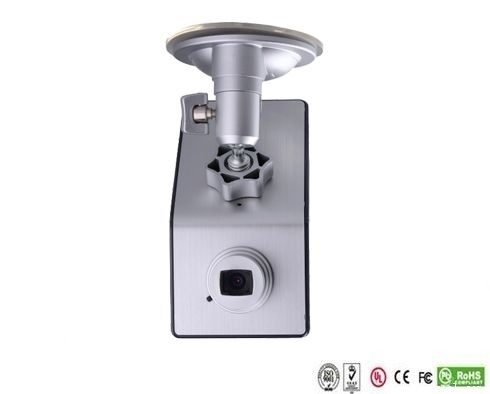
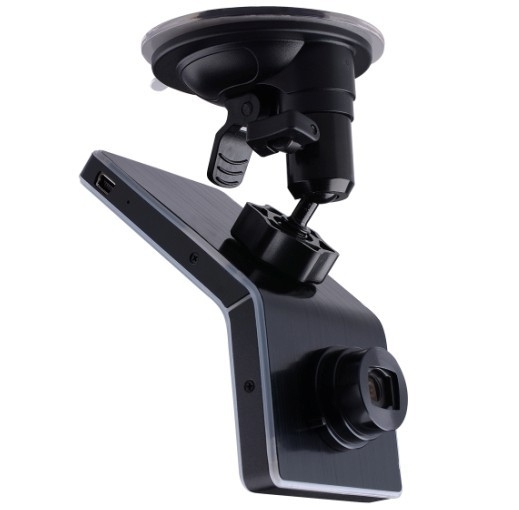
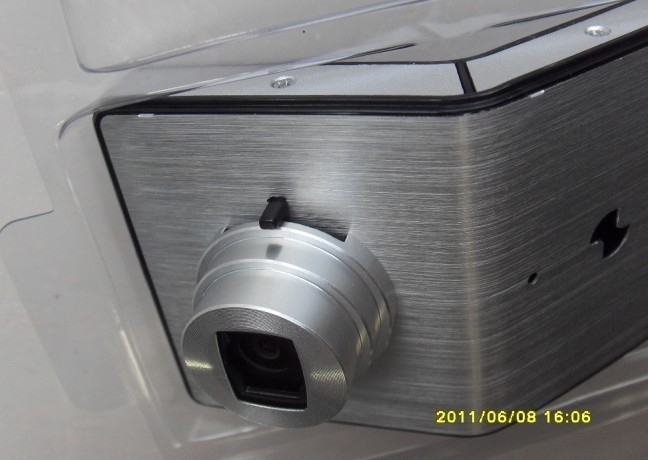
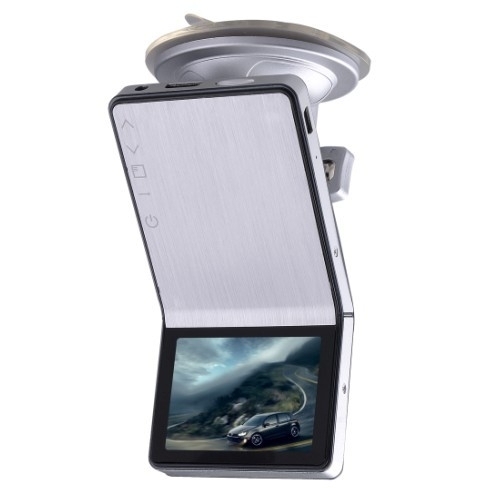
Cauți acest model? Contactează-ne pentru a verifica prețul, disponibilitatea sau o alternativă potrivită.
Descriere
Краткий обзор
Lens: Fixed, 4G, f=2.6mm F=2.0
Lens Viewing Angle: 120°
Focus Range: 1.8m to infinity
Display Screen: 2.4”TFT LCD
AV Output: HDMI Port, CTS1.2, AV Out Port, CVBS
USB Output: USB Port, USB2.0
TV System: NTSC / PAL
Video Format: MOV
Video Resolution: 1920*1080, 1280*720, 848*480, 640*480
Video Compress Format: MPEG- 4AVC / H.264
Audio Built-in Microphone/Speaker
Recording Media: Support Micro SD Card up to 32GB
Record Cycle, Not Cycle
RTC Yes
OSD Language: English / Italian / Russian
/Japanese / S. Chinese / T. Chinese
PC Interface: USB2.0
Power Supply: 12V / 24V convert to 5V,
Built-in Li-ion Battery
Size: 60x120x35mm
Weight: 115G
Working Temperature: -10~70 C
Storage Temperature: -30~85 C
Описание
Full HD1080P car camera reversing, 5.0 Mega Pixel Sensor Car Camera DVR.
Full HD 1080P Mobile-I DVR-10 Car Black Box
1. iPhone fashionable style and Ultimate Slim Design leads the fashion trend
2. 1080P high-resolution, 500 million actual pixels SENSOR, H.264 compression format. Best expression!
3. The unique adjustable angle lens, hidden button-shaped set, excellent surface treatment process. It is the Boutique of car dvr.
4. Cool and stylish black and silver color.
Specifications
Image Sensor: 5.0 Mega Pixel
Lens: Fixed, 4G, f=2.6mm F=2.0
Lens Viewing Angle: 120°
Focus Range: 1.8m to infinity
Display Screen: 2.4”TFT LCD
AV Output: HDMI Port, CTS1.2, AV Out Port, CVBS
USB Output: USB Port, USB2.0
TV System: NTSC / PAL
Video Format: MOV
Video Resolution: 1920*1080, 1280*720, 848*480, 640*480
Video Compress Format: MPEG- 4AVC / H.264
Audio Built-in Microphone/Speaker
Recording Media: Support Micro SD Card up to 32GB
Record Cycle, Not Cycle
RTC Yes
OSD Language: English / Italian / Russian/Japanese / S. Chinese / T. Chinese
PC Interface: USB2.0
Power Supply: 12V / 24V convert to 5V, Built-in Li-ion Battery
Size: 60x120x35mm
Weight: 115G
Working Temperature: -10~70 C
Storage Temperature: -30~85 C

Video Recording
After connecting Mobile-i to socket by car charger and the cable, it'll start recording automatically if it's set in cycle recording. If it's not cycle recording, it'll turn on automatically and then you have to manually press on <Power Switch > key to start recording.
Please use our standard car charge and USB cable for power supply, or it may not successfully charged by the ones from others.
Now the really time image will display on Mobile-i screen.
Stop engine, it'll keep on recording for about 10 seconds and then shutdown. If don't want to record during driving, please manually press on <Power Switch > key to save the video and turn off it.
* Some kinds of vehicles are designed for long-term power supply that can't shut down automatically and need manually press on <Power Switch > key to save the video and turn off Mobile-i.
* Under not cycle recording mode, Mobile-i will save the videos and stop recording automatically when the memory card is full.
If Mobile-i isn't connecting to the socket, please manually press on <Power Switch > key to turn it on, and then real time image will display on the screen and press on <Power Switch > key to start video recording.
Press on <Power Switch > key again to save video automatically and stop recording. Long-press on <Power Switch > key until hearing a sound to turn off Mobile-i.
* The first time you use Mobile-i, we suggest charge its battery for 3 hours.
* If you won't use Mobile-i for a long time, please recharge the battery in every two months to prolong its' service life.
Video Playing
Play the video by Mobile-i screen
Turn on Mobile-i and stop recording, long-press on <Enter >
key to enter into preview mode, press on <Up > <Down >
key to select video and press <Enter > key to start video playing.
Play the video by PC
Please stop recording before connecting Mobile-i to PC. Use the USB cable to connect it to PC and a removable disk will show up in my computer accordingly. Now it can be used as a large capacity disk.
All the videos are saved in the disk. Choose a suitable player to play the videos.
If you want to save the video forever, please copy the video to your PC.
Play the video by TV
a. Use TV cable to Connect Mobile-i to TV, then the real time image will show on TV, press on <Enter > key to play video. Press on <up > or <down >key to select video to play when there are more than one video in it.
b. Use HDMI cable to connect the attached HDMI Convertor to HDTV, then the real time HD image will show on HDTV which creating the vision enjoyment for you. Control the video
playing by the bottoms on Mobile-i.
* Before playing the video by TV ( a.b), please press on <Power Switch > key to turn on Mobile-i first.
* HDMI Convertor are included but no HDMI cable, please purchase it in separately
LED Status
Working Status Red Green Blue
Power Off Off Off
Power On Off ON Off (On under charging)
Recording FLASH ON Off (On under charging)
SD Car bad contact Off FLASH Off (On under charging)
USB Mode Off ON Off (On under charging)
USB Mode(no SD card) ON ON Off (On under charging)
Li-ion battery low Off Off Flash and then shutdown automatically
Program Update
Please go to our website www.ricoel.com to download the latest program.
Use the attached USB Cable to connect Mobile-i to PC and then copy the program to the SD card.
Press on <Power Switch > key to turn on Mobile-i, and then it'll automatically update the program and after the update finish, it'll shut down automatically.
Please delete the program from the SD card after update, or it'll update the program automatically every time you turn on Mobile-i.
Recenzii despre produs
Fii primul care scrie o recenzie despre acest produs.
Scrie o recenzie
Autentifică-te pentru a scrie o recenzie despre produs.
Intră în contModerăm recenziile pentru relevanța experienței cu produsul, spam, date personale și abuz. Publicăm opinii pozitive și negative; nu respingem o recenzie pentru că nota este mică.