

Toate produsele
-
Electrocasnice
- Electrocasnice mari
- Mașini de spălat
- Uscătoare de rufe
- Mașini de spălat vase
- Aragaze
- Plite încorporabile
- Cuptoare încorporabile
- Hote
- Accesorii
- Tehnică de bucătărie
- Microunde
- Combaine de bucătărie
- Blendere
- Mixere
- Mașini de tocat carne
- Aburitoare
- Multifierbătoare
- Mini cuptoare
- Aerogrili
- Cuptoare de pîini
- Prăjitoare de pîini
- Friteuze
- Ceainice
- Termopote
- Aparate de cafea
- Râșnițe de cafea
- Cântare
- Feliatoare
- Storcătoare
- Plite de masă
- Accesorii
- Tehnică pentru casă
- Aspiratoare
- Mașini de spalat podelele
- Generatoare de abur
- Curățătoare de abur
- Fiere de călcat
- Echipamente de călcat
- Ceasuri și stații meteo
- Dedurizatoare de apă
- Accesorii
-
Tehnică climaterică
-
Tehnică de cusut
-
Tehnică profesională
-
Tehnică p/u sănătate si ...
-
Produse pentru copii
-
Audio-Video
-
Foto-Video-Optică
-
Calculatoare și periferice
- Calculatoare și periferice
- Notebook-uri și netbook-uri
- Blocuri de sistem
- Monoblocuri
- Tablete
- Console pentru joc
- Monitoare
- Mouse
- Tastiere
- Căști
- Microfoane
- Componente
- Matrice
- Sisteme de răcire
- Memorii operative
- Plăci de bază
- Carduri video
- Discuri flexibile (HDD)
- Unități optice
- Surse de alimentare
- Carcase
- Memorie externă p/u stocare
- Discuri flexibile externe
- Carduri de memorie
- Imprimante și scanere
- Imprimante
- Aparate multifuncționale
- Scanere
- Proiectoare
- Proiectoare
- Ecrane
- Accesorii
- Echipamente de rețea
- Routere fără fir
- Accesorii
- Consumabile
- Cartușe
- Toner
- Mecanică
- Chimie
- Soluție p/u curățare
- Accesorii
- Pelicule de protecție
- Autocolante
- Poșete, cutii, plicuri p...
- Cabluri
- Baterii
- Acumulatori
- Încărcătoare
- Echipamente p/u servere
- Servere
-
Telefoane si faxuri
-
Casa protejată
-
Produse sezoniere
-
Construcție și reparație
-
Instrumente
- Electroinstrumente
- Mașini de găurit
- Mașini de găurit cu diamant
- Perforatoare
- Ciocane demolatoare
- Mașini de înșurubat
- Mașini de înșurubat piulițe
- Ferăstraie pendulare
- Rindele
- Mașini de frezat
- Mașini de șlefuit
- Ferăstraie sabie
- Ferăstraie circulare
- Ferăstraie pentru tăieri...
- Foarfece
- Asiratoare
- Betoniere
- Pistoale cu aer cald
- Aparate de sudură
- Ferăstraie electrice
- Hidrofoare
- Compresoare
- Mașini de tăiat gresie ș...
- Pompe
- Trimmere electrice
- Șurubelnițe electrice
- Polizoare de banc
- Mașini de găurit
- Mașini de lustruit
- Mașini de tuns gazonul
- Mixere
- Mese pentru mașini de fr...
- Dispozitive electrice de...
- Nivele laser
- Accesorii
- Scule pe benzină
- Generatoare pe benzină
- Ferăstraie pe benzină
- Motocoase
- Motopompe
- Suflante
- Motocultoare
- Mașini de îndepărtat zăpada
- Mașini de tuns gazonul
- Scule pneumatice
- Pistoale pneumatice de b...
- Scule de mână
- Pulverizatoare
- Stații de pompare
-
Mobilă și interier
-
Transport
-
Sport și călătorii
Видеорегистратор Autois DVR-8 HD
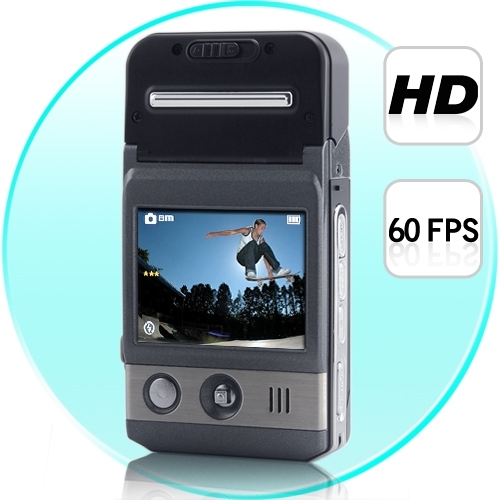
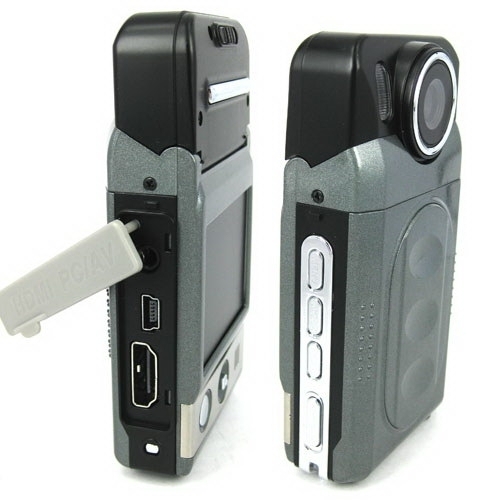
Cauți acest model? Contactează-ne pentru a verifica prețul, disponibilitatea sau o alternativă potrivită.
Solicită ofertă
Descriere
|
Sensor |
5.0Mage pixel CMOS |
|
Still mage |
4032X3024(12M);3264X2448(8M); |
|
Recording resolution |
1280X720,640X480,320X240 |
|
Display |
2.0″ TFT LCD |
|
Extral |
SD Card(Up to 32GB ) |
|
Zoom |
8 x Digital zoom |
|
EV |
EV-2---EV+2 |
|
White Balance |
Auto/Sunny/Cloudy/Tungsten/Fluorescent |
|
ISO |
Auto/100/200/400 |
|
Format |
JPEG /AVI |
|
Port |
USB2.0/HDMI/TV (PAL/NTSC) |
|
Sys. request |
Windows 2000/XP/VISTA/7 |
|
Power |
Rechargeable li-ion battery |
|
Wrok Temp |
0-40 ℃ |
|
Size(mm) |
98.2(L) X 53(W) X 22.5 (H) MM/ Weight: 88 g |
Описание
Features
Mini size mobile lens with combination design cooperates with multi-function to use , helping you screen HD videos or photo easily in every situations . Catch the high definition pictures at will, and show vivid again.

•2.0 inch LTPS TFT LCD
•1/2 inch high definition with photosensitive original part .
•4 pieces fix foucus lens:foucus range:10cm-infinity
•8 X Digital zoom
•120 DEGREE View-Angle
•Night-Vision
•Video format:AVI
•Built-in Mic and speaker
•High capacity lithium-ion rechargeable battery
•Support SD(SDHC)card
•HDMI port:TV/HDMI,suitable for high definition TV
•Loop video recording functions.
•Set video recording time.
•Set 180-degree reverse shot
•charging while video recording
•Can be sent to automatically recording when the car engin starts
•Screen sleeping mode

Instruction
Inserting and Taking out Battery
1.Open battery cover by pushing it down.
2.Insert battery according to the “+””-” marks to the right positions.
3. Please refer to the following diagram for battery status.

1.Battery cover must be open before take out the battery.。
Charging battery
Using the charger:One end of cable connectsthe charger and the other links the USB port of the camcorder,It will take about 4 hours under the camcorder is on.
Inserting &Taking out Memory Card(SDHC card)
1.Carefully insert the memory card into card slot until the card is tightly fixed.
2.To remove the card,memory the card softly,and then it will bounce out.
Note:
1.Before using SD card,please check if it is locked.
2.Please make sure SD card is insert to the right direction.Insert to direction it might cause damage to camcorder and SD cards.
3.After SD card has been into the card solt.the camcorder will automatically take SD card as default storage card,therefore all data stored before insert cannot be read until it has taken out.
4.If the memory card is not campatible with Camcorder,The card might be not be read.In this case,take out the card and insertit again or just change to another SD card.
Installing the Hanging Strap
The ring in the camcorder is designed for hanging strap or buckle.Available for fashion style and convenience to use.
Operation Instructions
Turn on/off camcorder and Automatic shut-off setting
1.Press power button for 1 second to turn on/off.
2. Roatate lens as below:

1.In order to save the power of the battery,auto off can be set in the “setting menu”.If no operation is conducted during the set time period ,the camcorder will turn off automaticaly.
Setting Date and Time
Turn on the power,Under any mode,press “MEMU" to setting mode.Press direction button downwards to select the “Date /time”.and then Press “OK”to setting the date and time,later press “OK”buttion again in order to finish the setting.

Camcorder mode
1.Camcorder automatically goes to video mode after it is turn on.At this time “ ”will appears upper right corner of the screen.
2.Press “REC”button to start recording,in order to stop recording,press record button again.
3.Press"MENU" button to enter menu,under menu mode can revise:
Resolution:set resolution of shoot
Video Time:This camcorder have automatic cover and loop recording function wich divide d into two models,one is 1 minutes,the other is 5 minutes.
4.You connect the camera to car charger, then the camera starts up automatically and records a vedio
Please do not move lens fastly when shooting,avoid scene switch quickly,only in this way you can shoot high quality video.
Night lights turned on,when lens focus on an object with a reflective surface,there can be a reflective film, exposure. Using it with cautions!
Camcorder mode
1.Camcorder automatically goes to video mode after it is turn on.At this time “ "will appears upper right corner of the screen.
2.Press “REC”button to start recording,in order to stop recording,press record button again.
3.Press"MENU" button to enter menu,under menu mode can revise:
Resolution:set resolution of shoot
Video Time:This camcorder have automatic cover and loop recording function wich divide d into two models,one is 1 minutes,the other is 5 minutes.
4.You connect the camera to car charger, then the camera starts up automatically and records a vedio
Please do not move lens fastly when shooting,avoid scene switch quickly,only in this way you can shoot high quality video.
Night lights turned on,when lens focus on an object with a reflective surface,there can be a reflective film, exposure. Using it with cautions!
Camera mode
1.Press power key to turn on camcorder AND It will go to video mode automatically,press”mode”switch to the photograph mode,the upper left corner of the screen will show “ ”and the buttonof the screen will display the maximum photo capacity.
2.Alignment by camcorder to the subject which to be taken,using direction key upwards and downwards in order to adjust focus.
Press “REC”button to take photos.
Please grasp camcorder to reduce vibrate when take photos.
Playback Mode
1.Turn on camcorder to video mode,press review key to enter into single-picture review mode,press directionkey leftwards and rightwards to review picutres or videos.
2.Delete
while reviewing (Reviewing pictures/video),press “Menu”,then delete key will appear on the screen,press “ok” to delet display,and press the direction key right to choose deleting file,then press “ok”to confirm.
Setting Mode
1.Regarding to video/camera/review mode,press”Menu” button could enter into any corresponding setting menu.
2.At any menu mode,press “OK”button will enable user for menu setting options to choose preferred setting,then press “ok”confirm.
Screen sleep mode
In the photography or camera video capture mode,press left key,you can enter into the screen sleep mode,press left key once again reverted to the orginal mode.
File backup
USB back up mode
Firstly,to press the “Memu”button to select the “USB”,Secondly,to press “OK”button to select the “Disk Drive,Thirdly,to press “OK”button to comfirm.With USB cable connected to the machine and computer.
Connecting camcorder to TV
1.Connecting camcorder to HDTV with an HDMI cable to review pictures and videos.
2.Connecting camcorder to television with TV cable to review pictures and video.

Function Keys
Video/camera mode
Power button Turn on or off camcorder
Shutter Button video recording /Stop
Direction Button(UP) 1/2/3/4/8 Digital zoom
Direction Button(Down ) 1/2/3/4/8 Digital zoom
Direction Button(Left) Fast switch to browerse picture video informations
Direction Button(Right) Night Light: On/Off
Menu Button Menu option
Mode Button Mode option
Playback Button Pictures and video review
Review Mode
Preview Mode(single-picture)
Power button Turn off camcorder
Direction button(Down) Index graphical representation
Direction button(Left) Last page
Recenzii despre produs
Fii primul care scrie o recenzie despre acest produs.
Scrie o recenzie
Autentifică-te pentru a scrie o recenzie despre produs.
Intră în contModerăm recenziile pentru relevanța experienței cu produsul, spam, date personale și abuz. Publicăm opinii pozitive și negative; nu respingem o recenzie pentru că nota este mică.