

Все товары
-
Бытовая техника
- Крупно бытовая техника
- Стиральные машины
- Сушильные машины
- Посудомоечные машины
- Кухонные плиты
- Встраиваемые варочные па...
- Встраиваемые духовки
- Вытяжки
- Аксессуары
- Кухонная техника
- Микроволновые Печи
- Кухонные комбайны
- Блендеры
- Миксеры
- Мясорубки
- Пароварки
- Мультиварки
- Мини печи
- Аэрогрили
- Хлебопечи
- Тостеры
- Фритюрницы
- Чайники
- Термопоты
- Kофемашины
- Кофемолки
- Весы
- Ломтерезки
- Соковыжималки
- Настольные плиты
- Аксессуары
- Техника для дома
- Пылесосы
- Поломоечные машины
- Парогенераторы
- Пароочистители
- Утюги
- Гладильное оборудование
- Часы и метеостанции
- Умягчители воды
- Аксессуары
-
Климатическая техника
-
Швейная техника
-
Профессион. техника
-
Техника для красоты и зд...
-
Товары для детей
-
Аудио-Видео
-
Фото-Видео-Оптика
-
Компьютеры и периферия
- Компьютеры и периферия
- Ноутбуки и нетбуки
- Системные блоки
- Моноблоки
- Интернет-планшеты
- Игровые приставки
- Мониторы
- Мыши
- Клавиатуры
- Наушники
- Микрофоны
- Комплектующие
- Матрицы
- Устройства охлаждения
- Оперативная память
- Материнские платы
- Видеокарты
- Жесткие диски
- Оптические приводы
- Блоки питания
- Корпуса
- Внешние накопители
- Внешние жесткие диски
- Карточки памяти
- Принтеры и сканеры
- Принтеры
- МФУ
- Сканеры
- Проекторы
- Проекторы
- Экраны
- Аксессуары
- Сетевое оборудование
- Беспроводные маршрутизаторы
- Аксессуары
- Расходные материаялы
- Картриджи
- Tонер
- Механика
- Химия
- Чистящие средства
- Аксессуары
- Защитные пленки
- Наклейки
- Барсетки, коробки, конве...
- Кабели
- Батарейки
- Аккумуляторы
- Зарядные устройства
- Серверное оборудование
- Серверы
-
Телефоны и факсы
-
Безопасный дом
-
Сезонные товары
-
Стройматериалы
-
Инструменты
- Электроинструменты
- Дрели
- Дрели для алмазного бурения
- Перфораторы
- Отбойные молотки
- Шуруповерты
- Гайковерты
- Лобзики
- Рубанки
- Фрезеры
- Шлифовальные машины
- Сабельные пилы
- Циркулярные пилы (Дисковые)
- Торцевые пилы
- Ножницы
- Пылесосы
- Бетономешалки
- Технические фены
- Сварочные аппараты
- Электропилы
- Гидрофоры
- Компрессоры
- Плиткорезы
- Насосы
- Электротриммеры
- Электроотвертки
- Шлифовальные станки (Точ...
- Сверильные станки
- Полировальные машины
- Газонокосилки
- Миксеры
- Столы для фрезера
- Электроподъёмники (Лебедки)
- Лазерные уровни
- Аксессуары
- Бензоинструменты
- Бензогенераторы
- Бензопилы
- Бензокосы
- Мотопомпы
- Воздуходувы
- Мотокультиваторы
- Снегоуборочные машины
- Газонокосилки
- Пневматические инструменты
- Пневмо гвоздезабиватели
- Ручные Инструменты
- Опрыскиватели
- Насосные станции
-
Мебель и интерьер
-
Транспорт
-
Спорт и путешествия
Видеорегистратор Autois DVR-8 HD
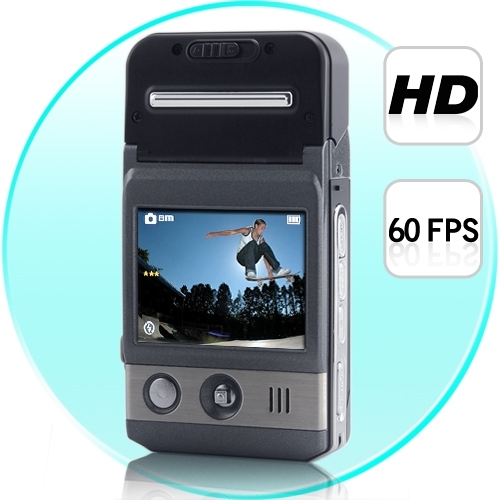
Ищете эту модель? Свяжитесь с нами, чтобы уточнить цену, наличие или подходящую альтернативу.
Запросить предложение
Описание
|
Sensor |
5.0Mage pixel CMOS |
|
Still mage |
4032X3024(12M);3264X2448(8M); |
|
Recording resolution |
1280X720,640X480,320X240 |
|
Display |
2.0″ TFT LCD |
|
Extral |
SD Card(Up to 32GB ) |
|
Zoom |
8 x Digital zoom |
|
EV |
EV-2---EV+2 |
|
White Balance |
Auto/Sunny/Cloudy/Tungsten/Fluorescent |
|
ISO |
Auto/100/200/400 |
|
Format |
JPEG /AVI |
|
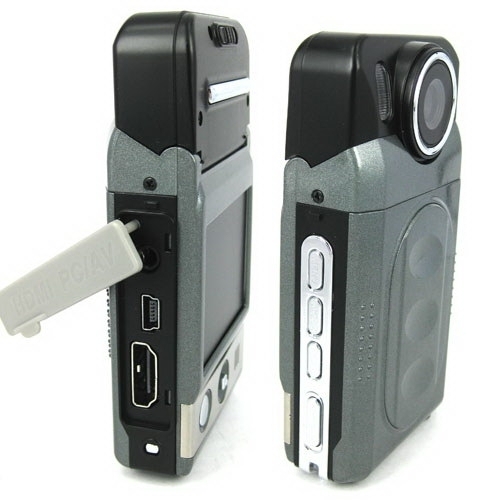
Port |
USB2.0/HDMI/TV (PAL/NTSC) |
|
Sys. request |
Windows 2000/XP/VISTA/7 |
|
Power |
Rechargeable li-ion battery |
|
Wrok Temp |
0-40 ℃ |
|
Size(mm) |
98.2(L) X 53(W) X 22.5 (H) MM/ Weight: 88 g |
Описание
Features
Mini size mobile lens with combination design cooperates with multi-function to use , helping you screen HD videos or photo easily in every situations . Catch the high definition pictures at will, and show vivid again.

•2.0 inch LTPS TFT LCD
•1/2 inch high definition with photosensitive original part .
•4 pieces fix foucus lens:foucus range:10cm-infinity
•8 X Digital zoom
•120 DEGREE View-Angle
•Night-Vision
•Video format:AVI
•Built-in Mic and speaker
•High capacity lithium-ion rechargeable battery
•Support SD(SDHC)card
•HDMI port:TV/HDMI,suitable for high definition TV
•Loop video recording functions.
•Set video recording time.
•Set 180-degree reverse shot
•charging while video recording
•Can be sent to automatically recording when the car engin starts
•Screen sleeping mode

Instruction
Inserting and Taking out Battery
1.Open battery cover by pushing it down.
2.Insert battery according to the “+””-” marks to the right positions.
3. Please refer to the following diagram for battery status.

1.Battery cover must be open before take out the battery.。
Charging battery
Using the charger:One end of cable connectsthe charger and the other links the USB port of the camcorder,It will take about 4 hours under the camcorder is on.
Inserting &Taking out Memory Card(SDHC card)
1.Carefully insert the memory card into card slot until the card is tightly fixed.
2.To remove the card,memory the card softly,and then it will bounce out.
Note:
1.Before using SD card,please check if it is locked.
2.Please make sure SD card is insert to the right direction.Insert to direction it might cause damage to camcorder and SD cards.
3.After SD card has been into the card solt.the camcorder will automatically take SD card as default storage card,therefore all data stored before insert cannot be read until it has taken out.
4.If the memory card is not campatible with Camcorder,The card might be not be read.In this case,take out the card and insertit again or just change to another SD card.
Installing the Hanging Strap
The ring in the camcorder is designed for hanging strap or buckle.Available for fashion style and convenience to use.
Operation Instructions
Turn on/off camcorder and Automatic shut-off setting
1.Press power button for 1 second to turn on/off.
2. Roatate lens as below:

1.In order to save the power of the battery,auto off can be set in the “setting menu”.If no operation is conducted during the set time period ,the camcorder will turn off automaticaly.
Setting Date and Time
Turn on the power,Under any mode,press “MEMU" to setting mode.Press direction button downwards to select the “Date /time”.and then Press “OK”to setting the date and time,later press “OK”buttion again in order to finish the setting.

Camcorder mode
1.Camcorder automatically goes to video mode after it is turn on.At this time “ ”will appears upper right corner of the screen.
2.Press “REC”button to start recording,in order to stop recording,press record button again.
3.Press"MENU" button to enter menu,under menu mode can revise:
Resolution:set resolution of shoot
Video Time:This camcorder have automatic cover and loop recording function wich divide d into two models,one is 1 minutes,the other is 5 minutes.
4.You connect the camera to car charger, then the camera starts up automatically and records a vedio
Please do not move lens fastly when shooting,avoid scene switch quickly,only in this way you can shoot high quality video.
Night lights turned on,when lens focus on an object with a reflective surface,there can be a reflective film, exposure. Using it with cautions!
Camcorder mode
1.Camcorder automatically goes to video mode after it is turn on.At this time “ "will appears upper right corner of the screen.
2.Press “REC”button to start recording,in order to stop recording,press record button again.
3.Press"MENU" button to enter menu,under menu mode can revise:
Resolution:set resolution of shoot
Video Time:This camcorder have automatic cover and loop recording function wich divide d into two models,one is 1 minutes,the other is 5 minutes.
4.You connect the camera to car charger, then the camera starts up automatically and records a vedio
Please do not move lens fastly when shooting,avoid scene switch quickly,only in this way you can shoot high quality video.
Night lights turned on,when lens focus on an object with a reflective surface,there can be a reflective film, exposure. Using it with cautions!
Camera mode
1.Press power key to turn on camcorder AND It will go to video mode automatically,press”mode”switch to the photograph mode,the upper left corner of the screen will show “ ”and the buttonof the screen will display the maximum photo capacity.
2.Alignment by camcorder to the subject which to be taken,using direction key upwards and downwards in order to adjust focus.
Press “REC”button to take photos.
Please grasp camcorder to reduce vibrate when take photos.
Playback Mode
1.Turn on camcorder to video mode,press review key to enter into single-picture review mode,press directionkey leftwards and rightwards to review picutres or videos.
2.Delete
while reviewing (Reviewing pictures/video),press “Menu”,then delete key will appear on the screen,press “ok” to delet display,and press the direction key right to choose deleting file,then press “ok”to confirm.
Setting Mode
1.Regarding to video/camera/review mode,press”Menu” button could enter into any corresponding setting menu.
2.At any menu mode,press “OK”button will enable user for menu setting options to choose preferred setting,then press “ok”confirm.
Screen sleep mode
In the photography or camera video capture mode,press left key,you can enter into the screen sleep mode,press left key once again reverted to the orginal mode.
File backup
USB back up mode
Firstly,to press the “Memu”button to select the “USB”,Secondly,to press “OK”button to select the “Disk Drive,Thirdly,to press “OK”button to comfirm.With USB cable connected to the machine and computer.
Connecting camcorder to TV
1.Connecting camcorder to HDTV with an HDMI cable to review pictures and videos.
2.Connecting camcorder to television with TV cable to review pictures and video.

Function Keys
Video/camera mode
Power button Turn on or off camcorder
Shutter Button video recording /Stop
Direction Button(UP) 1/2/3/4/8 Digital zoom
Direction Button(Down ) 1/2/3/4/8 Digital zoom
Direction Button(Left) Fast switch to browerse picture video informations
Direction Button(Right) Night Light: On/Off
Menu Button Menu option
Mode Button Mode option
Playback Button Pictures and video review
Review Mode
Preview Mode(single-picture)
Power button Turn off camcorder
Direction button(Down) Index graphical representation
Direction button(Left) Last page
Отзывы о товаре
Будьте первым, кто оставит отзыв об этом товаре.
Написать отзыв
Войдите в аккаунт, чтобы оставить отзыв о товаре.
Войти в аккаунтПроверяем отзывы на соответствие опыту использования товара, спам, персональные данные и оскорбления. Публикуем положительные и отрицательные мнения; низкая оценка сама по себе не является причиной отказа.